BlackBerry Smartphone in 2019? S01E47 - It's year 2019 and perhaps the younger generation has already forgotten the BlackBerry brand. During its heyday, BlackBerry smartphones were commonplace and literally none of its competitors stood a chance in terms of technology. Is it still worth it to use or own a BlackBerry smartphone nowadays? Let's find out!
BlackBerry released a new version of its flagship Passport smartphone. It is called the BlackBerry Passport Silver Edition. By its name, one can tell that its color is silver. It will also come with a stainless steel frame for extra strength and durability. Its keyboard has been improved and its corners are now rounded. Moreover, a diamond weave pattern can be seen on the back for improved grip.
Aside from the above mentioned changes, the BlackBerry Passport Silver Edition will have the same specs and features as the original Passport. So it will also feature a 4.5-inch 1,440 x 1,440 IPS LCD with Gorilla Glass 3 protection, Qualcomm Snapdragon 801 SoC with 3GB RAM and 32GB of expandable internal storage. It will also have a 13-MP rear camera with optical image stabilization (OIS) and an LED flash. There is also a 2-MP front-facing camera on board. Connectivity-wise, it features Wi-Fi, Bluetooth, GPS, NFC, and LTE. A 3,450 mAh battery will keep its lights on. The new Silver Edition runs BlackBerry OS 10.3.2 and will be able to play Android Apps from the Amazon Appstore. It will cost $549 unlocked and for a limited time, you will also get some free accessories (Flip Case, Flex Shell and Sync Pod) with it worth $130. It will be available in the US, Canada, UK, France, Germany, Italy, Spain, and the Netherlands.
The BlackBerry Leap is latest member of the BlackBerry 10
family. It is a midrange offering with looks eerily similar to the BlackBerry Z3. Specs-wise, it comes with a 5-inch 720p HD display resulting in a pixel density of 294 ppi. It packs an outdated Snapdragon S4 Plus chip (same as that of the BlackBerry Q10 and Classic) with a 1.5GHz dual-core Krait CPU and 2GB RAM. There is also 16GB of expandable internal storage.
Image by BlackBerry
Imaging-wise, the BlackBerry Leap features an 8-MP auto-focus camera with LED flash and up to 5x digital zoom. It can record videos up to 1080p Full HD resolution at 30 fps. Measuring 144 mm x 72.8 mm x 9.5 mm and weighing 170 grams, this smartphone is rather heavy. The
battery under its textured soft back cover is 2,800 mAh and isn't removable.
BlackBerry says it can last up to 25 hours of heavy use. The smartphone runs BlackBerry OS 10.3.1 out of the box and comes with BlackBerry Blend, BlackBerry Assistant, access to Android apps via the Amazon App Store, and more. It will launch in April 2015 for the price of $275, which is rather expensive for what it offers. Check out its promo video below:
In a rather odd but not surprising move, BlackBerry has launched a camera-less version of its Classic smartphone, which is now available for pre-order at Verizon. But why exactly would BlackBerry opt for such feature (or the lack thereof)? Well, there are actually companies that do not allow their employees to go to work with any devices containing cameras. In addition, some of those who serve in the military are not allowed to bring camera phones with them inside. The BlackBerry Classic is essentially the same Classic smartphone with both of its cameras removed.
Image by Verizon
The BlackBerry Classic Non Camera still packs a 3.5-inch display of 720p HD resolution, an old 1.5GHz dual-core Qualcomm Snapdragon processor, 2GB RAM, 16GB of expandable storage space, and a 2,500 mAh battery. It runs BlackBerry OS 10.3.1 out of the box. Set to ship this March 31, 2015, the smartphone costs $99.99 with a two-year Verizon contract or $399.99 contract-free. Any takers?
The BlackBerry Passport has been officially introduced and can be bought unlocked for just $599. This is a promotional price though as it is originally priced at $699. The BlackBerry Passport is unique in many ways - its unorthodox wide boxy look among them. Its QWERTY keyboard is also not the typical one as it lacks the physical punctuation/number keys. It makes up for that through virtual keys and its innovative keyboard that doubles as a track pad. Among its key features are a 4.5" IPS LCD touchscreen display of 1,440 x 1,440 resolution, a 13-MP primary camera with optical image stabilization, 32GB of internal storage with microSD card slot, 3,450 mAh battery (up to 30 hours battery life), 1080p FullHD video recording at 60 fps, Corning Gorilla Glass 3 protection, and official access to the Amazon AppStore for downloading Android applications. Check out its promo videos below:
The BlackBerry Porsche Design P'9983 is now official. It is the successor to the Porsche Design P'9982 released last year. The P'9983 is packed with a 3.1-inch square Super AMOLED touchscreen of 720p HD resolution. It measures 119 mm x 67.1 mm x 10.6 mm and weighs 140g. Spec-wise, it is eerily similar to the BlackBerry Q10. It may actually be a reincarnation of the Q10 in a different body. In the imaging department, the Porsche Design P'9983 is equipped with an 8-MP rear camera and a 2-MP front-facing camera. It is powered by an ancient Qualcomm Snapdragon S4 Plus chipset, which comes with a 1.5 GHz dual-core CPU and an Adreno 225 GPU. It has 2GB RAM and 64GB of internal storage that can be expanded further via microSD card slot. It runs on BlackBerry OS 10.3 and will be able to support many Android applications. A 2,100 mAh battery keeps the smartphone on. Connectivity-wise, it will have support for 4G LTE, dual-band Wi-Fi (802.11n), FM radio, Bluetooth 4.0, GPS, and NFC
Image by CrackBerry
But more than its specs, the BlackBerry Porsche Design P'9983 will have to rely on its looks (premium design and finish) to sell. It comes with sapphire glass for the camera lens, forged stainless steel for the Porsche Design logo and chassis, and "a special glass-weave technology for the back door".
In the box, you'll find a premium stereo headset, an international charging kit, a polishing cloth, and a USB cable. There will be exclusive aftermarket accessories available too. It will become available this October 2014 at Porsche Design stores, as well as select carriers and retailers across the world. There's no word on pricing yet but it will definitely be very expensive.
New BlackBerry CEO John Chen recently showcased two new high-end smartphones of the company: the BlackBerry Passport and the BlackBerry Classic. Here's hoping that these two flagship smartphones turn things around for the troubled company.
Image by CrackBerry
The BlackBerry Passport packs a
4+ inch screen with 1440 x 1440 pixel resolution. It will be powered by a Snapdragon 800 chipset coupled with 3GB RAM. There is also 13-MP
rear camera and a massive 3,450mAh battery will keep the
phone running. Interestingly, the BlackBerry Passport also sports an odd looking QWERTY keyboard below the screen. The
keyboard lacks punctuation and number keys, and users would have to press down on
the keys to type and swipe over them for other functions. The
BlackBerry Passport will launch on September 2014.
Image by CrackBerry
The other BlackBerry smartphone that will launch this year is the BlackBerry Classic, which is successor to the BlackBerry Q10.
It packs the iconic BlackBerry QWERTY keyboard, complete with touchpad and function keys. It will pack a 3.5-inch capacitive touchscreen.
Announced at this year's Mobile World Congress in Barcelona, the
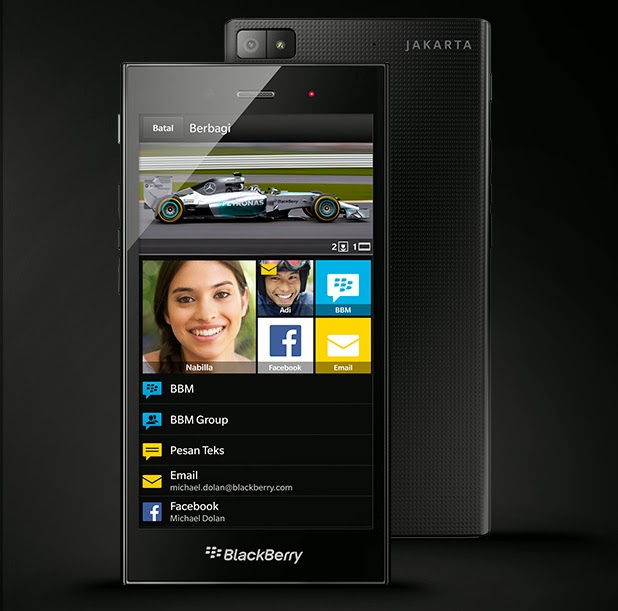
BlackBerry Z3 is now available for pre-order in Indonesia through local
carriers such as Indosat and XL. However, it won't be available until
May 13.
Image by Fone Arena
The
BlackBerry Z3 will be available in 2 versions: the regular one and the
Jakarta Edition, which will have the name of the Indonesian capital
engraved on its back panel. This special edition of the Z3 was made to
commemorate its launch as the first BlackBerry smartphone built for the
Indonesian market.
Image by Fone Arena
The BlackBerry Z3 will just cost $190 or IDR 2,199,000. It
packs a 5-inch qHD display, 8GB of internal storage, expandable via
microSD card slot, 1.5GB RAM, and a dual-core 1.2GHz Snapdragon 200
processor. There will be a 5-MP rear shooter and a 1.1-MP front-facing camera. All of these will be powered by a 2,500 mAh battery. There's no word yet on the BlackBerry Z3's international availability.
Looks like Canadian company BlackBerry is not yet giving up. It may have even raised the bar higher by coming up with another luxury smartphone, similar to the previously released BlackBerry Porsche Design P'9981. Photos below show that the BlackBerry Z10 will also have a Porsche Design edition, which will bear the name BlackBerry Porsche Design P'9982. This would be the second official luxury smartphone model from BlackBerry.
Image by GSMArena
Besides the leaked photos, there are no available information on rumored BlackBerry smartphone yet. What we know is that it will cost more than an arm and a leg. Rumors have it that it could cost more than USD$2000. Will you be getting one in case this materializes?
BlackBerry may have finally entered the elite 5-inchers club of smartphones with its rumored A10 Aristo. Naturally, it will compete with the likes of high-end smartphones such as the Samsung Galaxy S4, Sony Xperia Z and the HTC One. The BlackBerry A10 Aristo looks very much like the BlackBerry Z10, only this time it will have a silver or white bar of plastic at the bottom. Its 5-inch display is of OLED technology with a 1,280 x 720 HD resolution.
Image by GSMArena
UPDATE: Below are the specifications of the BlackBerry A10. It has a 1.7GHz dual-core processor, quad-core GPU, 2GM RAM, 16GB internal storage (expandable thru microSD card), 8-MP camera, NFC, and a 2,800 mAh battery.
Image by GSMArena
Based on rumors, the first versions of the device would
be constructed in Vietnam but will also be headed to the US to be carried by
AT&T. Both the BlackBerry A10 Aristo and BlackBerry 9720 are rumored to be hitting the market well within 2013. Below is a hands-on video of the BlackBerry A10 Aristo:
Good news to all BlackBerry fans! The BlackBerry Z10 has already been launched in the country. In fact, you can now pre-order the said handset. The Z10 will be commercially available on March 19 in all authorized BlackBerry distributors.
Priced at PhP29,990, it may not be the most affordable flagship smartphone out there. In fact, it's priced higher than the Galaxy S III, Nokia Lumia 920, and HTC and Sony flagships. But yes, it's cheaper than the iPhone 5. Packed with so many new features, the Z10 is indeed the best and most capable BlackBerry smartphone to date.
Be one of the first #BB10PH users by reserving your new BlackBerry Z10. For reservations, click on the photo below:
Will you be one of the first to grab the coveted BlackBerry flagship smartphone?
I'm sure that everyone is excited about BlackBerry's all-new operating system, which is the BlackBerry 10 OS. In this review, I will cover Gestures, BlackBerry Hub, BlackBerry Keyboard, Voice Control, Camera, BlackBerry Protect, BlackBerry World, and some other pre-installed applications. Join me as we take a tour inside BlackBerry's new OS and app ecosystem.
1. Gestures
The most important gesture is swiping up from the bottom bezel, which
always brings you back to a tiled view of all the running apps. Up to eight apps can be kept
running in the background on this screen and bringing one back to life
just requires a tap. Or, to properly kill a running app, hit the X in
the lower right.
Repositioning of apps is performed
by tapping and dragging, while dropping one on another creates a folder.
Folders are represented by a smaller grid of icons within a single app
icon space, with no other identifying characteristic, which makes them a
bit hard to pick out amidst the sea of apps. Widgets and other desktop-like
controls are not supported here. There is also a static area holding three special controls: a
phone, a search glass and a camera.
Swiping up and holding causes a row of
icons to arrive from the left, representing unread emails, calendar
reminders and the like. A red asterisk by any of these means you have
something new to look at.
2. BlackBerry Hub
Swipe up and to
the right and you'll see an aggregated list
of emails, Twitter replies, and DMs. Also, text messages, BBMs, Facebook
messages, voice mails and missed calls. System updates and even LinkedIn messages will be listed here. It can be a little
overwhelming especially if you have multiples of each type
of account to manage. Overall, as a communication tool, BlackBerry Hub is
powerful if you get relatively few messages scattered across multiple
platforms.
When it comes to calendar invites, it's very easy.
Just scroll down in Hub and those appear up top, ready for your tapping.
And, as ever, if those meetings take place on a conference bridge, just
tap the number to dial in. This sort of navigation has always been a
trademark of BlackBerry, and it's great to see it live on here.
But, if that mega-list of all your messaging gets overwhelming, you can
filter it by an individual account, perhaps showing only Twitter
messages and replies for your work account or only your BBMs. This is
done by grabbing the lower-left icon, which has three notches drawn on
the side, and dragging it right to expose all the accounts you've added
to the phone. This is a gesture and control common on many of the stock
apps. You then tap the content that you want or, for more control, you
can dive into the settings and individually pop them on or off.
3. BlackBerry Keyboard
The
virtual keyboard in BlackBerry 10 OS is good. It may well be the best
stock keyboard of any mobile OS at the moment -- a good thing, because
there's no way to replace it. It starts with a comfortable layout, which
includes rows of generously sized keys separated by gray bars meant to
evoke the chrome ones found on many a BlackBerry QWERTY handset in the
past. This gives even meaty thumbs plenty of space.
It's a four-row layout to
begin, with no dedicated buttons for numbers or characters other than
letters, comma, period and, of course, a space. But, to get to numbers
and other special characters you just swipe downward, which kindly
cycles through two pages of special characters. A swipe from right to
left, meanwhile, deletes whatever word was just entered.
Finally, the most talked-about point here is the predictive nature of
the thing. The keyboard snoops through your email and social history to
get an idea of what phrases you commonly type and files those away.
4. Voice Recognition and Control
The BlackBerry 10 OS also offers full voice
recognition -- handled via network, as on most mobile devices, meaning
you'll need to stay actively connected if you want to take this for a
spin. There's a dictation feature, accessed by holding down the period
key. The voice recognition feature is said to be quite impressive.
Then there's also the Voice Control feature, which allows you to give your phone some simple commands, much like Siri. Hold down the play/pause button on the phone and a female voice
asks you what you'd like to do. Any attempt to get directions or navigation to a location or
contact would be rebuffed, and the service is unfortunately unable to deliver
answers to simple questions. It
simply hands all those off to Bing.
5. Camera
The camera has a dedicated icon on the bottom of the main interface. The interface is simple, with a
focus reticle in the center that changes to green and contracts slightly
when focus is achieved. The typical ellipsis in the lower-right corner
brings up a quick menu that lets you switch between front and rear
cameras, toggle shooting modes, select from one of four predefined
scenes, enable/disable the flash, and select between 16:9 and 4:3 images.
When it comes to the
business of taking photos, there's no discrete shutter button here,
either physical or virtual. You just tap anywhere on the screen to take
the picture. To select a different focus point other than dead-center
you have to manually drag the reticle around before snapping the
picture, which is cumbersome.
BlackBerry has
also bundled in a feature called Time Shift that, when taking a shot of a
group of people, actually takes a burst of photos and then lets you
selectively choose the best frame for each individual in the photo.Once images
are taken, you can review them and, should you like, open them up in a
reasonably comprehensive editor to crop, rotate, color adjust -- or get
more funky with a series of Instagram-like filters.
6. BlackBerry Protect
BlackBerry Protect gives BlackBerry 10 OS users an
integrated way to find their missing BB handset.
Enable the service on your device and you're enabling the means for it
to phone home when lost. That's done via a BlackBerry-hosted website,
which offers the ability to view your phone's current location, make it
play a sound or make it display a message. You can also lock it remotely
and, if things should go completely pear-shaped, remotely wipe it with
the click of a button.
BlackBerry World is the all-conquering portal for spending money on
BlackBerry 10. Here you can get apps, music, and movies -- the vast
majority of which are all available at a premium. Yes, there are plenty
of free apps, but you'll find a disappointingly low ratio of free to
paid apps compared to Google's Play Store and even
Apple's App Store. And, being a new OS, there's a general shortage of
apps overall.
There are a lot of heavy-hitters, like Dropbox, Angry Birds Star Wars,
Box, andFoursquare. But, there are also a
lot of missing players, like Netflix and Hulu, media apps that many
smartphone users on other platforms use daily. (Kindle isn't there, but
it's coming, says Amazon.)
That shortage of apps does not extend to the multimedia aspects of
BlackBerry World, thankfully. Plenty of premium music is on offer,
though we found pricing here to be often higher than elsewhere. Unorthodox Jukebox
from Bruno Mars is $11.99 here, or $1.49 per track, versus just $5.99
on the Amazon MP3 Store (where it's $0.99 per track). Likewise, it's
$10.99 in iTunes ($1.29 per track). Similarly, Babel from Mumford & Sons is $12.99, compared to $9.99 on Amazon and $11.99 at iTunes.
Video content, thankfully, has more competitive pricing. Taken 2
is $4.99 to rent here ($4.98 on Amazon, $5.99 on iTunes) or $16.99 to
buy ($12.99 on Amazon and $14.99 on iTunes), while an episode of Modern Family
is $1.99 to buy here, which matches both Amazon and iTunes. But, it
must be pointed out that this content can only be downloaded to up to
five devices, an unfortunate and seemingly dated restriction.
8. Browser, BBM, Stock Apps, and Others
Browser
The browser built into BlackBerry 10 is quite
good indeed, and we'll get what may be its hallmark out of the way
early: it supports Flash. Yes, this is one mobile browser that's happy
to serve up every annoying, flashing and bouncing banner ads it can find.
The browser is a
fairly traditional experience, with a URL bar at the bottom doubling as
a search field for Bing. A button to the left of that gives quick
access to bookmarks and history, while the vertical ellipsis on the
right pops up a context menu offering buttons for things like accessing
settings and bookmarking the current page. It also allows access to the
Reader mode, which strips out all the pictures and ads and gives you a
single, lean look at the text on the page. Unfortunately, there's no way
to save that view for later offline reading.
BBM
BBM lives on, and gets the very useful
addition of video chat. That adds on to the voice chat feature that was
included with BlackBerry 7. To start a voice or video chat, just go to
the messaging interface with that person and tap the icon in the
upper-right corner. Video chats are only possible with people also using
BB10, but you can do a voice chat with folks on older versions.
Also new is a screen-sharing function, which
could make mobile enterprise support a far easier thing. While in a
video chat, users can opt to share what's currently on their own
display, making collaboration or troubleshooting much easier -- even
when you're just stuck trying to fill out a digital crossword puzzle.
Calculator
The calculator app in
BlackBerry 10 is much the same, offering the same playful color scheme. Punch away and your figures are tallied on a
virtual paper tape, which can be virtually torn off and thrown into the
virtual trash bin. There's also an integrated unit converter and a handy
tip calculator, if you really want to make sure your cheap friends are
doing their part.
Compass is another simple but visually striking (and fun-to-use) app.
This is just a floating compass that always points north (thanks to the
integrated magnetometer), but it has a very clean, simple look that
makes it a pleasant thing to look at and, as the compass disk is
floating freely, it's interesting to turn the phone around and see that
disk from the sides and even the bottom. Granted, not the most useful
app here, but you might be more inclined to use this to find your way
about than the default maps application.
In an era when mapping and navigation are increasingly important
pieces of a mobile platform's pie, the Maps app in BlackBerry 10 is
functional at best. The features on offer here pale in comparison to
even Apple's oft-derided option in iOS 6. You can
search for POIs and look at a map to see where a given contact is
located and then get navigation to that destination. There is no re-routing for traffic, no satellite overview, no
POI displays, no gestures to look around the map while navigating and,
should you ever lose your connection, it will result in a complete loss of functionality.
The app only works when you're online, not even caching routes once you
get going, so you'd best restrict your expeditions to areas with good
signal coverage.
BlackBerry 10 OS entering the smartphone OS race is indeed a breath of fresh air. As such, it has a lot of potential, software and hardware-wise. It would be a challenge for BlackBerry to compete with Android and iOS, but it has a big chance of getting its market share back from Windows Phone and the vacuum that Symbian and MeeGo have left. Kudos to BlackBerry for doing its best in getting more developer support and coming up with pretty innovative smartphone features. I hope we haven't seen the last of BlackBerry yet. Whether BlackBerry will make it or break it, it is all up to the consumers and its loyal fans.
For more information about the BlackBerry 10 OS, visit Engadget.com where I got most of these data. Source
We all know that Super Bowl is the most watched event in the United States. It normally follows that most big brands would want to show their advertisements in the said event as well. This year, fortunately, all the Super Bowl commercials ran as planned. This includes ads by both BlackBerry and Samsung.
At BlackBerry's camp, the company showcased what the BlackBerry 10 OS and Z10 flagship CAN'T do since 30 seconds is not enough to show all its features. While we're not sure if this is the best marketing for the BB10 OS right now, it is indeed clever and smart, but it is also a bit lazy.
Samsung didn’t disappoint either, offering the full 4:41 minutes promo of its Galaxy Note II promo on YouTube. It’s not the best Super Bowl 2013 video but it’s not half bad either. As you would expect the video features the Galaxy Note II, the Note 10.1, Seth Rogen, Paul Rudd and current NBA regular season and Finals MVP LeBron James.
BlackBerry’s chief executive Thorsten Heins has just confirmed that ‘all existing PlayBooks’ will get updated to BlackBerry 10. This is great news for you guys who bought the once ill-fated BlackBerry tablet. With this announcement, BlackBerry has just proven that product and software support is of utmost importance to them, which is good.
The 7-inch PlayBook tablet was released in a few versions varying by capacity and connectivity. According to Heins, the company is trying to figure out a way to sell a tablet with services since just selling hardware isn’t really bringing sufficient profits.
“We are looking for specific value added services on top of the tablet.” When asked about the company’s goals, Marketing Head Frank Boulben said that BlackBerry wants to quickly become the third biggest name in smartphones.
The BlackBerry Z10 smartphone had just been announced and is aimed at getting back market share lost by BlackBerry to iOS and Android. But the question is...will it be easy for BlackBerry to get back its market share? Well, ultimately, this will depend on the consumers and how well BlackBerry markets the brand. Hiring Alicia Keys as BB's newest Creative Director and endorser is a start. But what does the future hold for BlackBerry, BlackBerry Z10, and its BlackBerry 10 OS?
This year will be a make or break year for the Canadian smartphone maker as it struggles to find a place in the already crowded smartphone and tablet market. Will its new design or new OS finally make up for lost ground? Let us find out what BlackBerry Z10 brings to the table and see for yourself if this smartphone is something you really need or just would like to have.
The design of the BlackBerry Z10 is very minimalistic. While it does resemble the iPhone 5 at first glance, it has so much more going on in its design to differentiate it from the Apple smartphone. Yes, it is made of plastic but it does look sturdy. Like the iPhone 5, it will come in two colors: black and white. But the white one won't be available to the public yet. And yes, there's also the red version, which I actually like, but will only be available to developers.
With a 4.2-inch, 1,280 x 768 display, it has a high pixel density of 355 ppi. In terms of waistline, it's not really the thinnest at 9.3mm (0.37 inch) but not that thick as well. The 2-megapixel front-facing camera, gunmetal speaker grille, and notification LED can be seen in front of the device. At the back of the device is the 8-megapixel camera that is able to record 1080p FullHD videos, accompanied by an LED flash. Physical buttons are limited to the volume rocker and sleep/wake toggle. It also has a hot-swappable microSD card slot, micro-USB (expandable up to 32GB only), micro-HDMI, and the 3.5mm jack ports.
The LCD is officially rated at 800 nits, which is quite
high for a mobile panel, making it easily visible outdoors in direct
sunlight. Contrast and color saturation are said to be quite good and
viewing angles excel when you're looking at the phone on either the left
or right sides. As mentioned, it has an 8-megapixel primary camera that is capable of shooting 1080p videos with video stabilization. Engadget describes it as a decent shooter, but not a
world-class one. The
camera is reasonably quick to focus and even quicker to capture images, letting you
capture roughly one shot per second.
The
BlackBerry 10 OS is a huge leap from BlackBerry OS 7, which makes it more or less equal to iOS and Android when it comes to functionality. According to Engagdet, "it's heavily gesture-based, with a swipe up from the
bottom bezel bringing you to the main interface, where you can select
between up to eight concurrently running apps for multi-tasking. All
installed apps are listed in a grid, not unlike iOS, which you can drag
and drop to re-arrange or create folders." The most important
gesture, however, is swiping up and to the right. This exposes the
BlackBerry Hub, which aggregates all your forms of connectivity into a
single, overpowering list. Through here you can keep up on everything
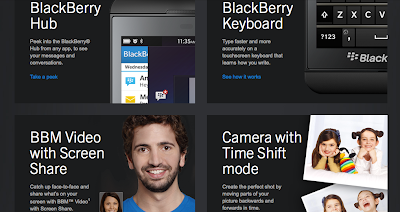
that's going on. Other new stuff include the very smart BlackBerry Keyboard, BBM Video with Screen Share, BlackBerry Balance, BlackBerry Remember, and Voice Control (which is similar to Google Now and Siri).
There are a number of pre-installed apps that come with the Z10. There are the calculator and compass apps. They also have a Maps app, which is worse than that of Apple's iOS 6 Maps. But wait, Z10 also manages to include popular ones such as Dropbox and Angry Birds. Some major entertainment apps still missing in the BlackBerry World include Netflix, Hulu, Pandora and Spotify.
From software, let's move on to hardware. The Z10 is powered by a 1.5GHz Qualcomm MSM8960 dual-core CPU paired with
2GB of RAM. Most apps launch promptly and, once launched, are snappy and
responsive. Web pages load in short order and pinch-zooming and other
common navigation tasks won't keep you waiting. Battery life is merely average but is user-replaceable. The 1,800mAh battery battery pack that comes with it may be insufficient thought and you may consider taking a second one
with you. But if there's one thing that will stop you from wanting
to ever pull the battery, it is the incredibly slow boot-up time. The Z10
takes more than a minute to boot up after the battery is removed and it
sometimes took up to 30 seconds just to shut itself down.
The BlackBerry Z10 is BlackBerry's best phone to date. With its QNX-based OS, removable battery, 2GB RAM, and other software tricks, there are many things to like about the smartphone. The sad part is that BlackBerry World still trails iOS, Android, and even Windows Phone, when it comes to the number of applications offered in the store. And this reason alone is given importance by many consumers. To be fair with BlackBerry, having 70,000 apps at launch is actually good, but is it good enough? To say the least, the Z10 will surely be loved by BlackBerry loyalists all over the world. And on that level, it will surely be a success. However, I'm not sure if this phone will be able to lure iOS, Android, and Windows Phone users away from their chosen mobile platform. Only time will tell and the time starts now. Did the Z10 arrive too little, too late? Or will BlackBerry rise from the ashes and slay formidable foes? Again, only time will tell.
Research In Motion (RIM), the maker of BlackBerry smartphones, did not just introduce a new OS and new smartphones, it also ushered in a new brand identity.
Speaking in New York during the BlackBerry 10 launch event, CEO Thorsten Heins announced that RIM will now be known as BlackBerry. The company has also changed its ticker symbol from RIMM to BBRY and introduced a new tagline, "One brand, one promise."
The company will showcase the new name in an upcoming SuperBowl ad.